
AI coding assistants have now become part of everyday software development. Tools powered by models such as Claude, GPT, and Gemini can explain code, generate implementations, debug issues, and even execute multi-step development workflows. These capabilities reflect the growing role of AI agents in the workplace, where AI systems are increasingly supporting complex tasks and automating business processes.
But most of these experiences depend on remote inference infrastructure.
What if we could run a model on our own hardware instead?
No external inference provider. No per-request API billing for local inference. Just our hardware, an open-weight model, and an application that puts it to work.
We started experimenting with local Large Language Models (LLMs) to answer a few questions:
- Can locally hosted LLMs assist developers with everyday coding tasks?
- Can they support agentic software development workflows?
- What kind of hardware do we need to make the experience usable?
What Happens When We Use a Cloud LLM?
The provider manages the underlying infrastructure, and we consume the model through an application or API.
We don’t have to worry about:
- Downloading model weights.
- Provisioning GPUs.
- Managing inference servers.
- Maintaining model-serving infrastructure.
- Scaling infrastructure when usage increases.
It is convenient because we can access increasingly capable models without owning the hardware required to run them.
But that convenience comes with its own trade-offs.
Why did we start exploring local LLMs?
A few things made us curious.
1. Offline accessibility
What if we could run an AI assistant without depending on an internet connection?
2. Subscription and usage costs
We wanted to understand whether running models ourselves could offer a more economical alternative, particularly for repetitive, smaller coding tasks.
3. Privacy and control
Running inference locally gives us greater control over where prompts and source code are processed.
4. Customization
Local models give us more freedom to experiment with model variants, quantization, system prompts, inference parameters, and deployment configurations.
We can explore different models and adapt the setup to a particular workflow.
The Experiment: Bringing Local LLMs into an AI-Assisted Development Flow
To run this experiment, we wanted to use a setup that was as close as possible to a regular development environment.
We chose VS Code as the IDE, Continue as the extension, and Ollama to run the model locally. Once everything was connected, we could interact with the local model directly from VS Code. This hands-on approach reflects how Hotbit Infosoft explores practical AI solutions and technologies for businesses.
Setup Summary
Component | Configuration |
IDE | Visual Studio Code |
Extension | Continue (VS Code) |
Model server | Ollama |
Model | SetneufPT/Qwen3.5–9B-Coder_Q4_256k_ABL_16GB-GPU |
Parameters | Approximately 9B |
Quantization | Q4 |
Physical RAM | 24 GB |
Model package size | Approximately 6.6 GB |
Advertised context window | 256K tokens |
The model is a community-packaged coding-oriented variant based on Qwen3.5 9B. It is configured for local coding-agent workflows and advertises a 256K context window.
Model reference: https://ollama.com/SetneufPT/Qwen3.5-9B-Coder_Q4_256k_ABL_16GB-GPU
The good news: Local models can be genuinely useful
Initial experiments showed that local models can handle certain coding tasks well by keeping the scope small and the context focused.
For example:
1. Understanding individual files
We could provide a file and ask the model to explain its implementation, identify important functions, or describe how different parts of the code interact.
2. Small code refactoring
Instead of asking the model to restructure an entire application, ask it to improve a specific function, simplify conditional logic, or clean up a small implementation.
3. Writing unit tests
Generating test cases for a specific function or module is another promising application.
4. Code reviews
A local model can inspect a selected file and point out:
- Potential bugs.
- Naming inconsistencies.
- Repeated logic.
- Missing error handling.
Where things became interesting: Hardware is part of the equation
Running a model locally is not simply a matter of downloading a model and starting a server. The hardware matters a lot.
Consider what happens when we run a model:
- The model weights need to be loaded into memory.
- The inference engine needs additional resources.
- The conversation and supplied code consume context.
- The KV cache stores information needed during generation.
- Other applications are competing for the same system resources.
And this is before we consider running an IDE, browser, Docker containers, or other development tools.
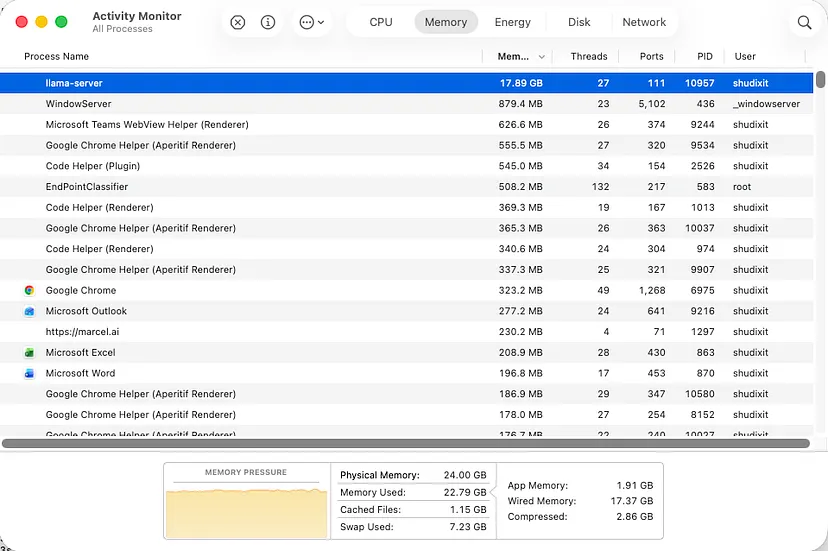
The Activity Monitor showed:
- Memory used: approximately 22.79 GB.
- llama-server memory consumption: approximately 17.98 GB.
- Swap used: approximately 7.23 GB.
This illustrates how quickly local inference can consume available resources.
The key distinction is that a model being able to start doesn’t mean the machine can run it comfortably.
This brings us to two related limits: quantization and context windows
Quantization
Model quantization reduces the numerical precision used to represent model weights.
For example, Q4 generally refers to 4-bit quantization.
The goal is to reduce memory requirements and make models easier to run on hardware with limited resources.
The trade-off is that quantization can affect model quality, depending on the model, quantization method, and task.
Context windows aren’t free
We also discovered that a model advertising a 256K context window doesn’t mean we can comfortably use all 256K tokens on our machine.
Longer context windows require additional memory, particularly for the KV cache.
This becomes important in software development because coding agents often send more than just our immediate question.
They may include file contents, previous messages, tool outputs, and other repository context.
So, a model may technically support a large context window while our hardware cannot practically accommodate it.
Local LLM vs Cloud LLM: What are we really trading off?
Both approaches solve the same fundamental problem: providing access to model inference.
But they distribute the responsibilities differently.
The difference comes down to how much control we want versus how much infrastructure we want to manage.
Neither approach is universally better. Local gives us more control, while cloud removes much of the infrastructure burden. The right choice depends on the workload, budget, and level of control we need.
The economics are less simple than they look
At first glance, local inference looks cheaper.
Download a model, run it, and use it without paying per request.
But there is an important distinction between having access to a model and having the infrastructure to serve it efficiently.
With local inference, the costs include:
- GPU or accelerator purchase.
- Electricity consumption.
- Hardware depreciation.
- Infrastructure maintenance.
- Engineering time spent configuring and optimizing inference.
- Additional capacity when multiple developers use the system.
With cloud inference, the economics are different.
Depending on the service, we might pay through a fixed subscription, token-based billing, or reserved infrastructure.
The infrastructure and maintenance burden is largely transferred to the provider.
There is also an important utilization question.
Suppose we purchase an expensive GPU but only use it for a few hours every day. We are still paying for the hardware even when it is idle.
This is particularly important when evaluating self-hosted infrastructure.
Local inference becomes economically viable when we have sufficient and predictable usage to justify the infrastructure.
For occasional development assistance, a cloud service may be more economical than purchasing and maintaining dedicated hardware.
For a team running frequent inference workloads, the calculation could be very different.
What about subscriptions?
We should also distinguish between AI coding subscriptions and API usage.
A developer paying for an AI coding subscription isn’t necessarily paying for each token individually.
Similarly, a cloud API user may pay according to input and output tokens.
These are different commercial models, and comparing them directly without understanding usage limits and pricing structures can be misleading.
The right comparison should be based on the actual cost of completing equivalent development tasks.
Does local inference mean better privacy?
Potentially, yes.
When inference happens entirely on our own machine, the prompts and source code don’t need to be transmitted to an external model provider.
Are local LLMs ready for agentic software development?
There is a difference between asking an LLM to explain a file and asking an AI agent to independently implement a feature across an entire repository. AI agents in the workplace can take on more autonomous, multi-step tasks, helping businesses move beyond basic AI-assisted interactions toward workflow automation.
Consider the difference.
Context windows aren’t free
A more complicated task:
- Explore the repository.
- Understand the project structure.
- Identify the relevant modules.
- Understand existing authentication patterns.
- Modify multiple files.
- Install or configure dependencies if necessary.
- Run tests.
- Interpret errors.
- Correct its implementation.
- Verify that the changes work together.