Businesses are under pressure to improve efficiency, control operating costs, and deliver faster customer experiences. Automation can support these goals, but choosing the wrong technology may create unnecessary complexity, maintenance work, and implementation costs.
Three technologies now appear frequently in automation strategies:
- AI Agents
- Robotic Process Automation (RPA)
- Workflow Automation
Although these terms are sometimes used interchangeably, they solve different problems.
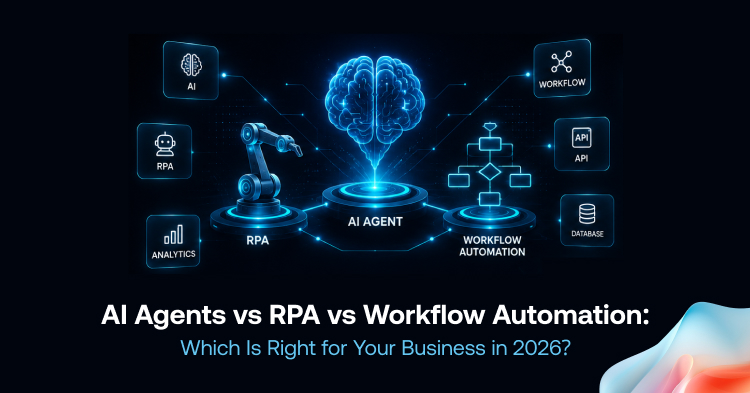
RPA performs repetitive digital actions according to predefined rules. Workflow Automation coordinates tasks, approvals, information, and system actions across a business process. AI Agents interpret information and select actions within defined objectives, permissions, and safeguards.
The right solution depends on the type of work being automated. Some businesses may need only one approach, while others may benefit from combining two or all three.
Why This Decision Matters in 2026
AI Agents are becoming more capable, but questions around security, interoperability, monitoring, and governance remain important.
In February 2026, the National Institute of Standards and Technology launched its AI Agent Standards Initiative to support secure and interoperable AI-agent adoption. The initiative focuses on standards, identity, authorization, and reliable interaction between agents and external systems.
Governance is also becoming more important as organizations move agents from experiments into production. In May 2026, Gartner predicted that 40% of enterprises could demote or decommission autonomous AI agents by 2027 because governance weaknesses were discovered only after production incidents.
This does not mean businesses should avoid AI Agents. It means they should select appropriate use cases, define permissions, monitor performance, and maintain human oversight where the consequences of an error are significant.
What Are AI Agents?
AI Agents are software systems designed to pursue defined goals by interpreting information, selecting actions, and using available tools or applications.
Many modern AI Agents use large language models, machine-learning models, enterprise data, APIs, business rules, and software tools. However, not every AI Agent relies on the same architecture.
Depending on how they are designed, AI Agents may be able to:
- Interpret natural-language requests
- Process structured and unstructured information
- Search approved knowledge sources
- Generate summaries and recommendations
- Use connected business applications
- Complete multi-step tasks
- Escalate uncertain cases to a person
Unlike traditional rule-based automation, an AI Agent does not always require every possible scenario to be scripted in advance. It may evaluate the available context and determine the next action within its assigned permissions.
However, this does not mean the agent learns permanently from every interaction or adapts safely to every change. Its reliability depends on the model, data, instructions, tools, testing, monitoring, and governance controls supporting it.
Explore our AI agent development services.
Common AI Agent Use Cases
Businesses may use AI Agents for:
- Customer support assistance
- Internal knowledge retrieval
- Sales lead research
- Document analysis
- IT service-desk support
- HR policy assistance
- Report summarization
- Market research
- Drafting routine communication
For example, a customer-support AI Agent may read an incoming message, identify the apparent issue, retrieve approved account or knowledge-base information, draft a response, and escalate the case when confidence is low or human approval is required.
Benefits of AI Agents
When implemented for an appropriate use case, AI Agents may help businesses:
- Reduce time spent searching for information
- Respond to routine requests more quickly
- Summarize large volumes of content
- Support employee decision-making
- Handle some variation in documents and conversations
- Coordinate actions across connected systems
These results are not automatic. Outcomes depend on implementation quality, data availability, user adoption, system reliability, and the level of oversight.
Limitations of AI Agents
AI Agents are not appropriate for every process. Common considerations include:
- Incorrect or unsupported outputs
- Incomplete source information
- Data privacy risks
- Excessive system permissions
- Prompt-injection and tool-use risks
- Integration failures
- Model and usage costs
- Regulatory requirements
- Need for human review
NIST’s AI Risk Management Framework recommends managing AI risk through governance, mapping, measurement, and ongoing risk management rather than treating deployment as a one-time technical project.
What Is Robotic Process Automation?
Robotic Process Automation uses software bots to execute repetitive digital tasks according to predefined instructions.
An RPA bot may:
- Click buttons
- Copy information between systems
- Enter data into forms
- Generate routine reports
- Apply predefined validation rules
- Update records
- Move files
- Interact with legacy applications
RPA is usually most effective when a process is stable, repetitive, high-volume, and based on structured data.
Common RPA Use Cases
Businesses commonly apply RPA to:
- Data entry
- Payroll administration
- ERP and CRM updates
- Report generation
- Transaction reconciliation
- Form validation
- Data migration
- Claims administration
- Account provisioning
For example, an RPA bot may compare an invoice against a purchase order, apply predefined validation rules, and enter approved information into an ERP system.
When invoices vary significantly in format, the process may also require optical character recognition or intelligent document-processing technology. UiPath describes its Document Understanding capability as combining RPA and AI to classify, extract, and interpret information from structured and unstructured documents.
Benefits of RPA
RPA may provide:
- Consistent execution of predefined tasks
- Reduced manual data-entry work
- Faster processing of high-volume transactions
- Detailed activity logs
- Integration with applications that do not offer modern APIs
- Predictable results when inputs and interfaces remain stable
Activity logs can improve auditability, but they do not automatically make a process compliant. Compliance also depends on correct rules, access controls, documentation, monitoring, and regulatory oversight.
Limitations of RPA
Traditional RPA can become difficult to maintain when:
- Application interfaces change
- Business rules change frequently
- Inputs are inconsistent
- Documents require interpretation
- Exceptions are common
- Tasks require contextual judgment
RPA can execute predefined decision rules, but it does not independently interpret ambiguity in the way an AI-enabled system may.
What Is Workflow Automation?
Workflow Automation coordinates how tasks, approvals, information, and system actions move through a business process.
It can determine:
- Who receives a task
- When approval is required
- Which notification should be sent
- What happens after a decision
- When a case should be escalated
- Which system should receive updated information
Workflow Automation primarily manages process flow, but modern platforms can also perform actions through connectors, APIs, scripts, and application integrations.
Microsoft Power Automate, for example, supports approval workflows and connections across services such as SharePoint, Dynamics 365, Salesforce, OneDrive, Zendesk, and WordPress. Its documentation also lists connectors that allow flows to interact with different applications and data sources.
Common Workflow Automation Use Cases
Workflow Automation is commonly used for:
- Employee onboarding
- Purchase approvals
- Contract reviews
- Marketing approvals
- Customer onboarding
- Procurement processes
- IT service requests
- Compliance reviews
- Leave requests
- Document approvals
For example, when a new employee joins a company, a workflow may notify HR, create an IT service request, assign training tasks, request equipment, and track completion across departments.
Benefits of Workflow Automation
Workflow Automation can help businesses:
- Standardize repeatable processes
- Reduce manual follow-ups
- Improve visibility into task status
- Coordinate work between departments
- Record approval decisions
- Identify process delays
- Maintain consistent routing rules
Limitations of Workflow Automation
Workflow Automation generally follows predefined process logic. By itself, it may not be able to interpret complex documents, understand ambiguous requests, or make contextual judgments.
These capabilities can be added by integrating the workflow with AI models, AI Agents, RPA bots, or human reviewers.
AI Agents vs RPA vs Workflow Automation
Real-World Business Applications
Customer Service
An AI Agent can interpret customer messages, retrieve approved information, draft responses, and recommend escalation.
An RPA bot can update CRM records, process qualifying refunds under predefined rules, or generate service reports.
Workflow Automation can route cases to the appropriate team, track response deadlines, and escalate unresolved requests.
Finance and Accounting
AI Agents may summarize financial reports, explain variances, review supporting documents, or flag unusual information for further investigation.
RPA can support invoice validation, bank reconciliation, payroll updates, and recurring data entry.
Workflow Automation can route invoices through approval levels while recording decisions and maintaining an audit trail.
Human Resources
AI Agents may answer routine policy questions, summarize interview feedback, or help employees locate approved information.
RPA can update employee records, process standard payroll changes, and transfer structured data between HR systems.
Workflow Automation can coordinate onboarding across HR, IT, facilities, security, and departmental managers.
Sales and Marketing
AI Agents may research prospects, summarize meetings, draft outreach, and assist with lead qualification.
RPA can update CRM records, synchronize contact information, and generate recurring campaign reports.
Workflow Automation can manage lead routing, campaign approvals, content reviews, and publishing steps.
IT Operations
AI Agents can assist users through conversational support, summarize incidents, and recommend troubleshooting steps.
RPA can perform predefined actions such as account provisioning, password-reset steps, and scheduled maintenance tasks.
Workflow Automation can coordinate incident response, change approvals, access requests, and service management processes.
Real-World Business Applications
Choose RPA When:
The right choice depends on the work being automated.
- The process follows the same steps repeatedly.
- Inputs are structured and predictable.
- Rules are clearly defined.
- Transaction volumes are high.
- A legacy application has limited integration options.
Choose Workflow Automation When:
- Work moves between several people or departments.
- Approvals are required.
- Tasks need to be assigned and tracked.
- Notifications and escalations are important.
- Process visibility is a major concern.
Choose AI Agents When:
- The task involves natural language.
- Documents or conversations require interpretation.
- The correct next action varies by context.
- Employees spend significant time retrieving information.
- The task requires recommendations or multi-step reasoning.
Combine Technologies When:
- A single process includes repetitive execution, coordination, and contextual judgment.
- Existing RPA bots need an orchestration layer.
- AI-generated decisions need structured approvals.
- Legacy systems must work with newer AI-enabled tools.
Example: Insurance Claims Processing
- Workflow Automation receives the claim and routes it to the appropriate team.
- RPA retrieves policy information and updates legacy systems.
- Document-processing tools extract information from submitted files.
- An AI Agent summarizes the claim and identifies missing or inconsistent information.
- A claims specialist reviews high-risk, uncertain, or exceptional cases.
Best Practices for Intelligent Automation
Start With a Clearly Defined Use Case
Improve the Process Before Automating It
Define Permissions Carefully
Keep Humans in the Loop
- Legal decisions
- Financial approvals
- Employment decisions
- Healthcare-related actions
- Regulatory compliance
- Customer disputes
- Low-confidence outputs
Establish Governance
- System owners
- Approved data sources
- Access permissions
- Escalation rules
- Monitoring responsibilities
- Testing requirements
- Incident-response procedures
- Rollback plans
Measure Results
- Processing time
- Exception rate
- Accuracy
- Human-review rate
- User satisfaction
- Cost per transaction
- System availability
- Escalation frequency
Best Practices for Intelligent Automation
Hotbit Infosoft helps organizations design automation solutions around defined business goals and measurable performance indicators.
AI Agent Development
Robotic Process Automation
Workflow Automation
Enterprise Integration
Automation Consulting
FAQ’s About AI Automation
What is the main difference between AI Agents and RPA?
Is Workflow Automation the same as RPA?
Can AI Agents replace RPA?
Can Workflow Automation execute tasks?
Are AI Agents suitable for small businesses?
Should every business combine all three technologies?
Conclusion
Let’s discuss your project.